
Every family has them: a shoebox of faded prints, an album with sticky yellowed pages, a wedding photo from the 1980s that only exists as one copy. Those photos won’t last forever, but you can save them. This guide shows how to reprint old photos in four simple steps: scan them with your phone, touch them up, reprint them, and store the originals safely.
Table Of Contents
- Why Reprint Old Photos Now
- Step 1: Scan Old Photos With Your Phone
- Step 2: Touch Up The Scan
- Step 3: Choose A Size And Reprint
- Step 4: Store The Originals Safely
- Ways To Use Reprinted Old Photos
- Frequently Asked Questions
Why Reprint Old Photos Now
- Old prints fade and yellow. Light, heat and humidity slowly damage photo paper, and Indian monsoons don’t help.
- Old albums can harm photos. Many “magnetic” albums with sticky pages and plastic sheets damage prints over time.
- There’s often only one copy. If that print is lost or damaged, the memory is gone.
- Families are spread out. A scan means every sibling and cousin can have their own print.
- Younger family members connect with clear photos. A sharp, fresh print of a great-grandparent gets looked at; a cracked one in a cupboard doesn’t.
Step 1: Scan Old Photos With Your Phone
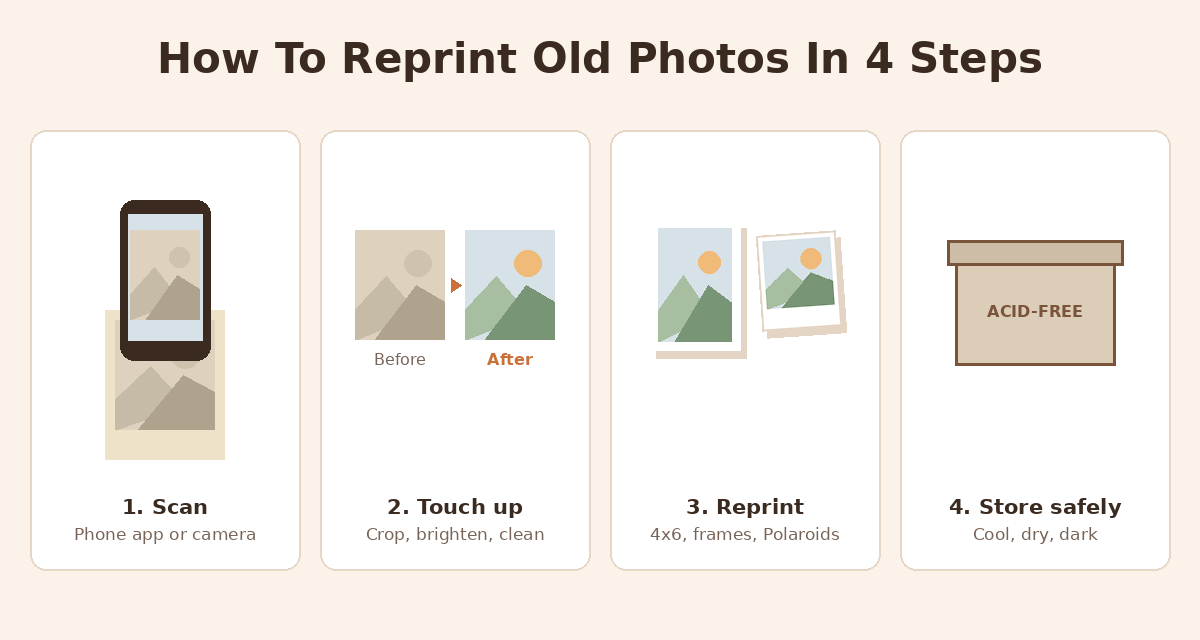
You don’t need a scanner. A modern phone camera captures more than enough detail to reprint an old photo at its original size or a little bigger.
The easiest option is a free scanning app such as PhotoScan by Google Photos, which takes several shots of the print and combines them to remove glare, then crops and straightens the result.
If you use your phone’s camera instead:
- Remove the photo from the album, if it comes out easily. Never force a photo stuck to an old page; scan it in place instead.
- Wipe the print gently with a soft, dry cloth to remove dust.
- Use soft daylight, near a window but out of direct sun. Turn off the flash, which causes glare.
- Hold the phone flat and parallel to the photo, directly above it, so the edges stay straight.
- Fill the frame with the photo, leaving only a thin margin.
- Tap to focus on a face before you take the shot, and take two or three shots of each photo.
- Check the result at full zoom. If faces look soft, retake it.
If you have a flatbed scanner, scan at 300 dpi or more for a same-size reprint, and 600 dpi or more if you want to print it up to twice as big. Family Tree Magazine’s scanning guide explains these settings in more detail.
Save the scans in two places, such as your phone and a cloud backup, and name the folders by year or event so they’re easy to find later.
Step 2: Touch Up The Scan
A little editing goes a long way. Free photo apps on your phone can handle most fixes:
- Crop and straighten so the edges are clean.
- Brighten faded photos gently, and lift the shadows to bring back detail.
- Remove dust spots and small scratches with a healing or spot-fix tool.
- Reduce yellowing by lowering the warmth slightly, or convert to black and white if the colour is too far gone.
Keep it gentle. Heavy filters and sharpening make old photos look artificial. The goal is a clean version of the original, not a new photo. Always keep the unedited scan as well.
For badly torn or water-damaged photos, a professional photo restoration service can rebuild missing parts. Small fixes, though, are easy to do yourself.
Step 3: Choose A Size And Reprint
Old Indian prints are often a little smaller than today’s 4×6 inch prints. Here’s how to choose a reprint size:
| Original photo | Reprint as | Notes |
|---|---|---|
| 3.5 × 5 inch print | 4×6 photo print | Slightly bigger; a thin strip may be cropped from one side |
| 4 × 6 inch print | 4×6 photo print | Same size, same shape |
| Small square or passport-size photo | 3×3 or 4×4 inch frame | Avoid enlarging tiny photos too much |
| Your best family portrait | 5×7 or 6×8 framed print | Scan carefully; larger prints show more detail and more flaws |
| A collection of everyday snaps | Polaroid-style prints | The white border suits vintage photos |
When you upload, use the crop tool to check that no faces are cut off at the edges. The shape of old prints doesn’t always match modern sizes exactly, so a small crop is normal.
Order a couple of extra copies of the photos that matter most, so every sibling gets one. Shipping is free on orders of ₹599 and above. For help with sizing, read our guide to the best photo print dimensions.
Step 4: Store The Originals Safely
Once you have scans and new prints, put the originals away carefully. Museum and archive guidelines, such as the State Historical Society of Iowa’s photo care advice, recommend:
- Keep them cool, dry and dark. Avoid bathrooms, kitchens, attics, outer walls and anywhere near water pipes. In humid months, a sealed box with a few silica gel packets helps.
- Use acid-free envelopes or boxes, or plain polypropylene sleeves. Avoid ordinary cardboard and wooden boxes, which are acidic.
- Take photos out of “magnetic” sticky-page albums if they come out easily, as the adhesive damages prints over time.
- Hold photos by the edges. Fingerprints leave oils that mark the surface.
- Write on the back in soft pencil only, never ink, which can bleed through.
- Remove staples, clips and rubber bands, which rust or stick to photos.
- Display the reprint, not the original, especially in a sunny room.
Ways To Use Reprinted Old Photos
- A family history wall: grandparents, parents and children in matching frames along a hallway. See our ideas for displaying photo prints at home.
- Then-and-now pairs: an old photo next to a new one taken in the same place or pose.
- A Polaroid album of the family: a Polaroid photo album has space under each page to write who’s in the photo and when it was taken.
- Anniversary gifts: parents’ wedding photos, reprinted and framed, for their silver or golden anniversary.
- Fridge magnets for grandparents: old family photos as Polaroid photo fridge magnets.
- A photo calendar: one old family photo for every month of the year with a custom photo calendar.
Related reads
- Best photo print dimensions for albums and keepsakes
- How to print custom Polaroid photos online in India
- Personalised photo frames for your home
Frequently Asked Questions
Can I reprint an old photo without the negative?
Yes. Scan or photograph the print with your phone, touch it up if needed, and upload the file to be printed. You don’t need the original negative.
How do I scan old photos with my phone?
Use a free app such as PhotoScan by Google Photos, or your phone camera. Place the photo in soft daylight, turn off the flash, hold the phone flat above the photo, fill the frame and tap to focus on a face.
Will a reprint of an old photo look as good as the original?
At the same size, a careful phone scan usually looks very close to the original, and a gentle touch-up can make it look better than the faded print. Enlarging a small or blurry photo a lot will show its flaws.
What size should I reprint old photos?
Most old prints reprint well as 4×6 inch photos. Small or passport-size photos suit 3×3 or 4×4 inch frames. Only enlarge to 5×7 or 6×8 inches if the scan is sharp.
How can I fix a faded old photo?
Use a free photo editing app to crop, brighten, lift shadows, remove dust spots and reduce yellowing. Keep the edits gentle, and keep the unedited scan as a backup.
How should I store old original photos?
Keep them in acid-free envelopes or boxes in a cool, dry, dark place, away from bathrooms and outer walls. Avoid sticky “magnetic” albums, handle prints by the edges and label the back only in soft pencil.