
Choosing the best photo print dimensions for albums and keepsakes comes down to more than picking a familiar size. Start with where the print will live: an album pocket, a scrapbook page, a memory box, a frame or a gift. Then match the print’s shape to the photo itself. Doing it in that order avoids the two most common disappointments: a print that doesn’t fit, and a crop that cuts off part of the memory.
A small print can hold a big story. A stack of 4×6 prints can tell the story of a whole trip. A grid of square prints turns friendship snapshots into a neat page. One 5×7 portrait can anchor a family keepsake. The right size gives each photo room to breathe without making the album bulky or uneven.
Table Of Contents
- Choose A Size Based On Where The Print Will Live
- Match The Aspect Ratio Before You Order
- Prepare Photos For Clear Long Lasting Keepsakes
- Key Takeaways
- Frequently Asked Questions
Choose A Size Based On Where The Print Will Live
The best size is the one that fits its destination, suits how closely it will be viewed, and keeps the important parts of the photo. Albums are flipped through up close, so smaller prints work well because details stay visible in the hand. A desk frame or a special family portrait benefits from a larger print with more presence.
Start With The Album Pocket, Not The Label
A print labelled 4×6 inches won’t necessarily fit every album sold as “4×6”. Album pockets have seams, edge lips, rounded corners and clear sleeves, all of which can shrink the usable opening, which is the space actually available for the photo.
Before ordering, measure the inside opening of one pocket, not the outside of the album. Measure width and height at the narrowest point. If the pocket is slightly smaller than the size on the label, choose a print that leaves a little room, or a format made for that pocket.
An album’s size describes the album. It doesn’t tell you how big each photo inside it can be.
This matters most with photo books and page-style albums. A square photo book may have margins, captions and gaps that make each photo much smaller than the page. The book’s format and the size of each printed photo are separate choices.
Compare The Most Useful Album And Keepsake Sizes
| Print Size | Approx. Metric Size | Shape | Best For | Avoid When |
|---|---|---|---|---|
| 4×6 inches (4R) | 10 x 15 cm | 2:3 | Standard albums, everyday family prints, travel photos | Important content sits right at the edges of a phone photo |
| 5×7 inches | 13 x 18 cm | 5:7 | Portraits, gifts, milestone photos | The album has small pockets or you need many photos per page |
| Square (e.g. 4×4 inches) | 10 x 10 cm | 1:1 | Grid layouts, social media photos, scrapbook pages | You need to keep a wide group photo or scenic view |
| Polaroid-style | Card from about 5 x 7.5 cm (mini) to 10.5 x 15 cm (large) | Photo area about 4:5, with a white border | Memory boxes, journals, Polaroid albums, wall and fairy-light displays | You want an edge-to-edge look with no border |
| 8×10 inches | 20 x 25 cm | 4:5 | Framed portraits, formal family photos | You want something that slips into an ordinary pocket album |
| 8×12 inches | 20 x 30 cm | 2:3 | Larger camera photos, scenic travel images | Your frame or page was designed for 8×10 |
| A4 | 21 x 29.7 cm | About 1:1.41 | Collages, scrapbook title pages, memory pages with notes | You’re filling standard photo pockets |
In India you’ll often see 4×6 called 4R. It’s the same print, about 10 x 15 cm, which helps when one shop lists sizes in inches and another in centimetres.
For everyday memory keeping, 4×6 Photo Prints are the easiest place to start once you’ve measured your album pocket. They’re compact enough for couple albums, family timelines, birthday collections and travel books without crowding the page.
Use Viewing Distance To Decide Between 4×6 And 5×7
A 4×6 print is held close, so it suits a sequence of moments: a café visit, a school event, a beach walk, a weekend getaway. A 5×7 gives faces and fine details more room, so it’s better for the one photo you want people to stop at.
Choose 4×6 when the story runs across many pages. Choose 5×7 when one photo tells the story on its own, like an anniversary portrait, a graduation photo, a newborn shoot or a family reunion group shot.
A travel album, for example, might use 4×6 prints for food, tickets, streets and candid moments, then save a 5×7 for the best mountain view or group photo. That contrast creates rhythm without needing a bigger album. And if that one photo deserves a spot on the wall, a personalised 5×7 photo frame keeps it on display instead of tucked inside a book.
Match The Aspect Ratio Before You Order
Aspect ratio is the relationship between a photo’s width and height. It decides whether a photo fills the print or loses something to cropping, and it matters more than the size name on the order page.
Understand The Shapes Behind Common Print Sizes
A 4×6 print is 2:3, as is an 8×12, just larger. A 5×7 is slightly squarer at 5:7. An 8×10 is 4:5, and square prints are 1:1. Polaroid-style prints have a photo area close to 4:5, surrounded by the familiar white border.
Most phone cameras shoot in 3:4 (or 4:3 when held sideways); Pixel phones, for example, label 4:3 as the “full image” setting. That’s why a phone photo rarely fits a 4×6 print perfectly, even though 4×6 is the classic album size. A portrait phone photo is a little wider than a portrait 4×6, so printing it edge to edge trims a strip from each side. In landscape, the trim comes off the top and bottom instead.
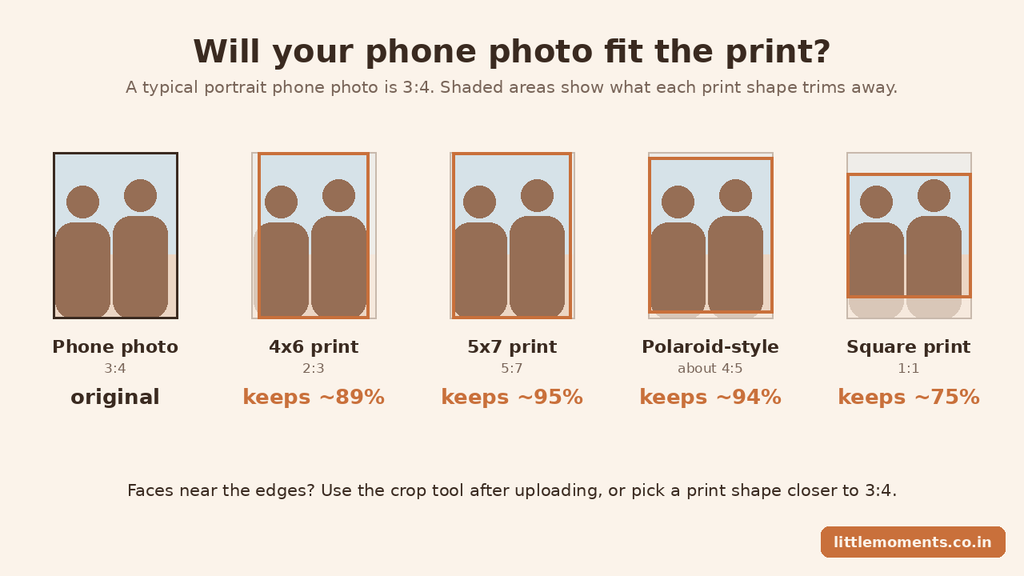
As the guide above shows, 5×7 and Polaroid-style prints keep almost all of a typical phone photo, 4×6 trims a little from the sides, and a square print trims the most.
Apply A Simple Crop Risk Rule
- Low risk: the photo and print share a shape, such as a 2:3 camera photo printed at 4×6 or 8×12, or a phone photo on a Polaroid-style print.
- Moderate risk: the shapes are close but not exact, like a phone photo printed at 4×6. Check the crop and adjust it carefully.
- High risk: faces, hands, signs, buildings or the horizon sit near the edge of a photo whose shape differs from the print, like a wide group photo going onto a square print.
Picture two people standing close together in a portrait photo with their shoulders near the edges. Printed edge to edge at 4×6, a sliver of each shoulder may be trimmed. You don’t always need a different size: re-centre the crop, or choose a shape closer to the original.
Why Polaroid-Style Prints Are So Forgiving
Because their photo area is close to the 3:4 shape phones shoot in, Polaroid-style prints usually need only a small trim. The white border frames the photo, separates it from the album page, and gives a set of mixed photos a consistent look.
They work especially well for:
- Memory boxes and journal pages
- Friendship and couple albums
- Small gift notes and care packages
- Photo walls and fairy-light displays
Polaroid Photo Prints come in mini, standard and large sizes, and Mini Polaroid Photo Prints are ideal when you want lots of small moments in a compact space. To keep them together, a Polaroid Photo Album in A5 or A4 turns a pile of prints into a proper keepsake.
Plan Layouts Around The Story, Not Just The Size
An album can do more than store photos. It can trace the shape of a relationship, a family’s history or a trip, and that order makes it easier to revisit years later.
For a couple album, move from first meetings to small routines, celebrations and favourite shared places. For a family album, group photos by year, child, festival or generation. For travel, follow the route: departure, arrival, daily highlights, people you met and one final favourite view.
Use one main size for consistency and one accent size for emphasis. A page of four 4×6 prints can show the flow of a day; the next page can hold a single 5×7 with a short note about why that moment mattered.
Prepare Photos For Clear Long Lasting Keepsakes
The right dimensions can’t rescue a blurry original. Print quality starts with choosing the right photo, then depends on cropping, resolution and how the print will be handled.
Select Clear, Well-Framed Photos
Choose photos that are sharp where it matters. In portraits, eyes and faces should look crisp on your phone screen. For group photos, zoom in to check that no faces are soft or in deep shadow. A photo can look fine as a thumbnail and still print fuzzy.
Before adding a photo to your order, check that:
- The main subject is in focus, not just the background
- Faces aren’t cut off at the forehead, chin, hands or shoulders
- Bright sky, windows or flash aren’t washing out faces
- The horizon is level, unless the tilt is intentional
- There’s some breathing room around the subject
- Any text, date or sign that’s part of the memory is still readable
If a photo is a little dark, brighten it gently. Heavy editing can flatten skin tones and add visible noise. For keepsakes, natural detail ages better than a strong filter.
Use Pixel Counts As A Practical Check
300 DPI is a common planning target for photo prints. It’s a useful guide, not a strict pass-or-fail rule, because quality also depends on the original photo, how much it’s been edited and how far away it will be viewed.
At 300 DPI, a 4×6 print works out to about 1200 x 1800 pixels, a 5×7 to about 1500 x 2100 pixels and an 8×10 to about 2400 x 3000 pixels. A photo below those numbers may still look fine small, but check it carefully before using it for a large print.
Most importantly, use the original photo from your phone’s gallery. Images that have been forwarded on WhatsApp or downloaded from social media are heavily compressed. If you must send a photo over WhatsApp, choose the HD option, though the original file is still best. A photo of just 10 to 15 KB will almost always print blurry, whatever size you choose.
Choose A Finish That Suits How The Print Will Be Handled
Albums protect prints, but keepsakes also get passed around, tucked into cards or propped on a desk. The finish changes both the look and how well a print handles everyday use.
| Finish | Look | Best For | Watch For |
|---|---|---|---|
| Glossy | Bright colours and strong contrast | Travel photos, celebrations, colourful albums and Polaroid-style prints | Reflections and fingerprints under direct light |
| Matte | Soft, low-glare surface | Portraits and prints handled often | Colours look less punchy than glossy |
| Lustre / satin | Balanced colour with reduced glare | Family albums and display prints | Not offered by every print service |
All Little Moments photo prints, including 4×6 and Polaroid-style prints, are printed on glossy photo paper for vivid colour. Slipping them into album sleeves keeps fingerprints off, and the National Archives notes that fingerprints can permanently mark photos.
To keep prints looking good for years, store them somewhere cool and dry, out of direct sunlight. The Library of Congress recommends photo-safe albums and sleeves made of uncoated polypropylene, polyethylene or polyester, and avoiding “magnetic” or self-adhesive album pages.
Check The Crop Before You Place Your Order
The crop step is your final quality check. On Little Moments products, you can adjust each photo with the crop tool right after uploading it. Use it to look beyond whether the photo simply fits:
- Are faces too close to the edge?
- Does the framing change between portrait and landscape?
- Is anything important being trimmed?
If something important is being cut off, try these fixes:
- Drag the crop box so the main subject sits comfortably inside it.
- Switch to a print shape closer to your original photo. For phone photos, 5×7 and Polaroid-style prints are the closest.
- Edit the photo before uploading, for example using the crop tool in the iPhone Photos app, so nothing important is near the edge.
- Choose a smaller print if the photo looks soft at the larger size.
If a photo isn’t in the shape of the product you’ve ordered and you skip the crop step, it will be cropped to fit, so a few seconds here saves a disappointing print later.
Key Takeaways
The easiest way to choose photo print dimensions is one decision at a time:
- Measure the usable opening of the album pocket, frame, scrapbook space or memory box.
- Check your photo’s shape before picking a print size.
- Choose 4×6 (4R) for compact albums when the crop looks safe.
- Choose 5×7 for portraits and milestone photos that deserve more attention.
- Choose Polaroid-style prints for phone photos, journals, memory boxes and displays.
- Use square prints for square albums, grids and social-media-style photos.
- Save 8×10, 8×12 and A4 for display pages, collages and frames rather than ordinary pockets.
- Check focus, brightness and the crop before you place your order.
A good album feels easy to look through. The right print dimensions support that quietly: consistent enough to feel organised, varied enough to let the important memories stand out.
Related reads
- How to select the right size for custom photo printing
- How to print custom Polaroid photos online in India
- How to choose an online photo printing service in India
Frequently Asked Questions
What Is The Best Photo Print Size For A Traditional Album?
For most traditional albums, 4×6 inches (also called 4R, about 10 x 15 cm) is the practical choice. It isn’t a universal pocket size, though, so measure one pocket’s usable opening before ordering, especially if the album has thick seams or rounded sleeve corners.
Is 4×6 The Same As 4R Or 10 x 15 cm In India?
Yes, they’re used as the same size. A 4×6 inch print is about 10 x 15 cm, and 4R refers to the same format. Conversions are rounded, so check the exact measurement if the fit is tight.
Should I Choose 4×6 Or 5×7 For Keepsake Photos?
Choose 4×6 for a larger collection of everyday moments and compact album pages. Choose 5×7 for a portrait, anniversary photo, family photo or travel view you want to stand out. Many albums use 4×6 as the main size and 5×7 sparingly as an accent.
Will A Phone Photo Be Cropped When Printed At 4×6?
Usually a little. Phone photos are 3:4 and 4×6 prints are 2:3, so a strip is trimmed from the sides (portrait) or the top and bottom (landscape). Use the crop tool after uploading to choose what stays. If faces are near an edge, a 5×7 or Polaroid-style print keeps more of the photo.
What Size Is Best For Group Photos?
A 5×7 is often the best choice because it gives faces more room than a 4×6. For a very wide group, check the shape first: a wide landscape photo keeps more of the scene at 4×6 or 8×12 than at 8×10 or square.
Is 8×10 Too Large For A Regular Photo Album?
For most pocket albums, yes. An 8×10 is better suited to a large scrapbook page, a frame or an album spread built around one photo. It makes a lovely display keepsake, but it isn’t practical for a standard sleeve album.
What Resolution Do I Need For A Sharp 4×6 Print?
About 1200 x 1800 pixels at 300 DPI is a good target. It’s a benchmark, not an absolute rule: a sharp original from a modern phone prints well at 4×6, while a blurry or heavily compressed image can look poor even with enough pixels. Always upload the original photo, not one forwarded through a chat app.
Which Photo Prints Suit A Polaroid Album?
Polaroid-style prints are made for it. Their white border gives every page a neat, consistent look, and their near-4:5 photo area suits phone photos with very little cropping. Pick the print size that matches your album’s pockets or page layout.
Pingback: Custom Polaroid Prints India: Print Your Memories 2026 Guide
Pingback: Best Online Photo Printing Service for Personal Memories in India
Pingback: Custom Photo Calendars in India 2027: Types, Prices & Ideas.
Pingback: Photo Print Trends 2026–27: 12 Ideas for Printed Photos
Pingback: How to Select the Right Size for Custom Photo Printing
Pingback: Custom Photo Frames Online: Sizes, Styles & Home Styling Guide
Pingback: Bringing Old Memories to Life with New Photo Prints
Pingback: How to Display Photo Prints at Home: 15 Creative Ideas
Pingback: How to Print Digital Photos Online: Step-by-Step Guide